
Data Migration in Recruiting: How to Switch Without Chaos, Data Loss, or Unnecessary Effort
A CRM or ATS migration is one of those projects that many recruiting agencies tend to postpone. Not because the change doesn’t make sense from a business perspective—but because the same concerns immediately arise: How much effort will it take? What happens to our data? Will we lose historical information? And how much will our day-to-day operations suffer?
These concerns are valid. A migration is not a small side project you can squeeze in between two placements. At the same time, it’s not an uncontrollable risk—provided that scope, process, and responsibilities are clearly defined.
That’s exactly what this guide is about: putting migration into perspective, answering common questions early, and showing what really matters in practice.
What Migration Really Means
Many people think of migration primarily as a technical process: export data, import it into the new system, done. But in reality, migrations rarely work that way.
In most cases, recruiting agencies are not simply switching from System A to System B with identical logic. Instead, different data structures collide, fields are organized differently, information has been maintained inconsistently over time, and some data simply doesn’t exist in the old system in the format required by the new one.
The real challenge is therefore not just transferring records, but ensuring that data is meaningfully structured and usable in the target system. This includes, among other things:
- different data structures in the old and new systems
- varying field logics
- legacy data with gaps, duplicates, or inconsistent maintenance
- relationships between candidates, clients, job searches, and activities
- the operational relevance of specific data points
That’s why a solid foundation of trust is essential in migration projects. When you migrate, you’re not just handing over data—you’re transferring a core part of your operational business model. If the provider doesn’t truly understand how recruiting agencies work, misunderstandings quickly arise where they cause the most damage: in mapping, prioritization, and decisions about which data must be migrated.
For this reason, migration effort can never be estimated reliably in general terms. Two agencies with the same number of records can face completely different levels of effort. What matters is not just the volume of data, but its structure, quality, history, and what is actually needed in the new system.
Which Data Should Actually Be Migrated
Scope is the most important lever for effort, duration, and complexity. This is where many projects become unnecessarily difficult—because the default reaction is often: everything must be migrated.
That sounds reasonable at first, but it’s often the most expensive and slowest approach. Not everything in the old system has the same value in the new one. That’s why it’s crucial to distinguish early between must-haves and nice-to-haves.
The better question is not: What can we migrate? But: What do we actually need for the team to work effectively in the new system?
In practice, migration scope usually falls into three levels.
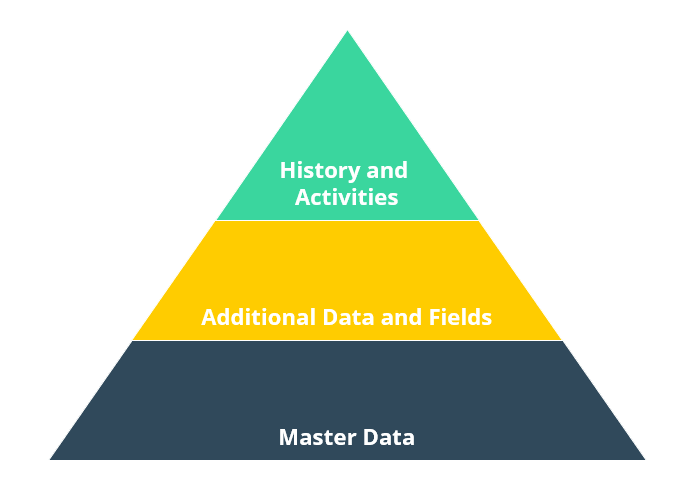
Level 1: Master Data Migration
The leanest and easiest-to-plan form of migration is transferring master data. This typically includes:
- candidate data
- clients and contacts
- core files such as CVs, documents, or profiles
For many agencies, this is a sensible starting point. It secures the operational foundation without introducing unnecessary complexity. To become productive quickly in the new system, you mainly need clean core objects and essential documents.
Especially if the legacy system has grown over time or data quality is an issue, Level 1 can be the best strategic choice. It creates clarity, reduces friction, and shortens the time to productivity.
Level 2: Extended Operational Data
The second level adds operational data relevant to day-to-day recruiting and sales, such as:
- notes
- job searches, jobs, or vacancies
- placements
- relationships between records
Here, the effort increases significantly. It’s no longer just about transferring individual records—relationships, context, and business logic become critical. It’s not enough to simply move fields; you must ensure that objects interact correctly in the target system.
This requires more coordination, more validation, and a clearer understanding of how the agency has worked in the past—and how it wants to work in the future.
Level 3: Full History and Activities
The third level is the most comprehensive and complex. It includes historical and activity-based data such as:
- email history
- activities
- tasks
- communication history
This is often the most challenging part of a migration—not because it’s impossible, but because it depends heavily on the logic of the old system. Historical data is often inconsistently structured, not always clearly classified, and varies widely in operational value.
That’s why Level 3 comes with the highest validation effort. Migrating full history requires more mapping, more validation, and significantly more coordination.
What Really Drives the Effort
The more historical and activity-based data you migrate, the more the following increase:
- mapping effort
- validation effort
- coordination requirements
- project risk
This is where friction often arises—not because of poor planning, but because additional requirements emerge, edge cases appear, or differences in how data is interpreted between systems become visible.
This friction is normal, but it can delay projects significantly if scope and priorities are not clearly defined early on. That’s why the most important strategic question at the beginning of any migration is: What truly matters—and what can we deliberately leave behind?
If this question isn’t answered clearly, migrations almost automatically become more expensive, slower, and more error-prone.
Migration as an Opportunity to Improve Data Quality
Many see migration as a necessary technical hurdle. In practice, however, it’s often a major opportunity to improve data quality.
If data is already being reviewed, structured, and transferred, it’s the perfect moment not just to move it—but to improve it.
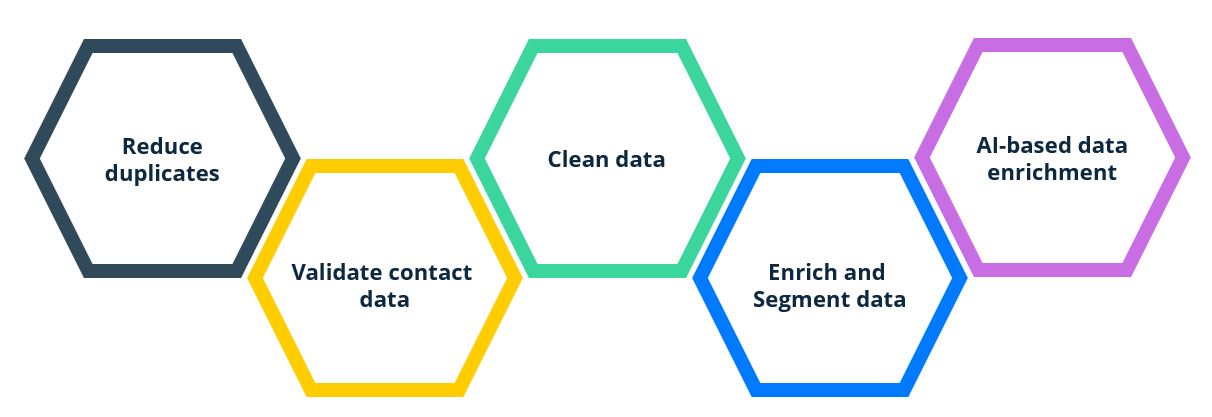
This includes, for example:
- reducing duplicates
- deliberately excluding outdated records
- verifying email addresses and phone numbers
- cleaning and structuring data
- enriching and segmenting existing data
- using AI to classify or prepare information
Recruiting agencies benefit greatly from this. Poor data quality is not just a system issue—it’s a revenue issue. Outdated candidate profiles, incomplete client records, or incorrect relationships don’t just harm the CRM experience—they slow down the entire operation.
A well-executed migration doesn’t just create a new technical setup. It can turn a historically grown data set into a reliable operational foundation.
The 3 Phases of a Successful Migration
For a migration to run smoothly, it needs a clear structure. In practice, successful projects usually follow three phases.
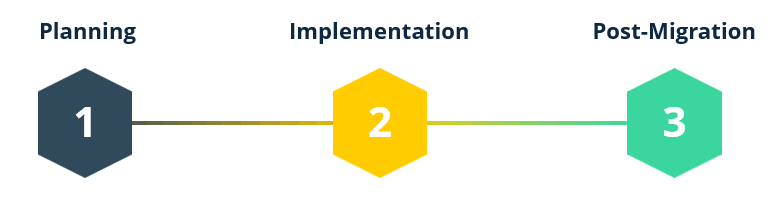
1. Planning
The planning phase lays the foundation for everything that follows. It determines whether a migration remains manageable or becomes unnecessarily complex.
This phase typically includes:
- gathering requirements and expectations
- defining the scope
- committing to the agreed scope
- requesting a backup of the legacy system
- setting a realistic timeline
- clarifying responsibilities
This step is often underestimated. Poor planning leads to costly corrections, misunderstandings, and delays later on.
2. Technical Implementation
In this phase, business decisions are translated into technical migration logic. Typical steps include:
- exporting data from the old system
- data mapping
- data transformation
- validating data logic
- creating and executing migration scripts
This is where preparation proves its value. Good implementation is not just about scripts—it’s about understanding. If fields, relationships, and meanings are not clearly defined, even the best scripts won’t be enough.
Quality assurance is also critical. Since the provider is responsible for a smooth process, the technical execution must meet high validation standards. The goal is not just to move data, but to ensure it is correct, usable, and transparent in the new system.
3. Post-Migration and Go-Live
After implementation comes the phase of review, correction, and finalization. This typically includes:
- reviewing data in a test environment
- running correction loops if needed
- planning the production migration
- requesting a final backup
- accounting for the “frozen zone”
- go-live
The “frozen zone” is particularly important and often underexplained. It refers to the short period between requesting the final backup and migrating to the live system. During this time, the team cannot continue working freely in the old CRM without risking inconsistencies.
In practice, this means new information, notes, or activities must temporarily be documented outside the system and added afterward. If this phase is not properly prepared, it can create confusion within the team.
A well-planned go-live ensures not only technical stability but also operational clarity.
Conclusion
Migration is not a side project. It affects data, processes, workflows, and ultimately the daily performance of a recruiting agency.
With the right provider, however, it is entirely manageable. The key is not to underestimate the effort. It depends primarily on scope and data quality. The earlier you clearly define which data truly needs to be migrated, the better you can control effort, risk, and timeline.
Good migration does not mean taking everything with you. It means transferring the right data—cleanly, meaningfully, and in a way that makes it usable in the new system.
And one more thing: the time invested in migration is often far more valuable than initially assumed—not just as project effort, but as an investment in cleaner processes, better data quality, and a system that truly supports daily operations.